

You’re not alone.
That sinking feeling when you’re met with a black screen or an endless loading spinner on RedGifs is a frustration shared by millions. With over 114 million monthly visitors, even a minor disruption can feel like a major outage.
But what’s really going on? Why is RedGIFs not working? Is RedGifs down, or is something else at play?
This guide will walk you through every possible reason why RedGifs is not working, from simple technical glitches to complex regional blocks. We’ll provide clear, step-by-step solutions to get you back to browsing, and most importantly, show you how to protect your privacy while doing so.

What is RedGifs?
RedGifs is a popular platform for sharing and viewing adult-oriented GIFs.
It carved out a niche after its predecessor, Gfycat, pivoted away from adult content. Today, it’s a massive hub for user-generated content, with users spending an average of over nine minutes on the site per session. I
ts deep integration with Reddit, which drives over 15% of its traffic, has made it an indispensable resource for many online communities.
What are the most common reasons RedGifs won’t load?
While it’s easy to assume the site is down, the problem often lies closer to home.
Several technical issues can prevent RedGifs from loading correctly. These range from simple browser-related problems to more complex network configurations.

Common culprits include a cluttered browser cache, interference from ad blockers, or even an unstable internet connection. In many cases, these issues can be resolved with a few simple troubleshooting steps.
Why is RedGifs blocked in your country?
If you’ve tried all the basic fixes and RedGifs still isn’t working, you might be facing a regional block.
Governments and Internet Service Providers (ISPs) are increasingly restricting access to adult content, and RedGifs has been a primary target.
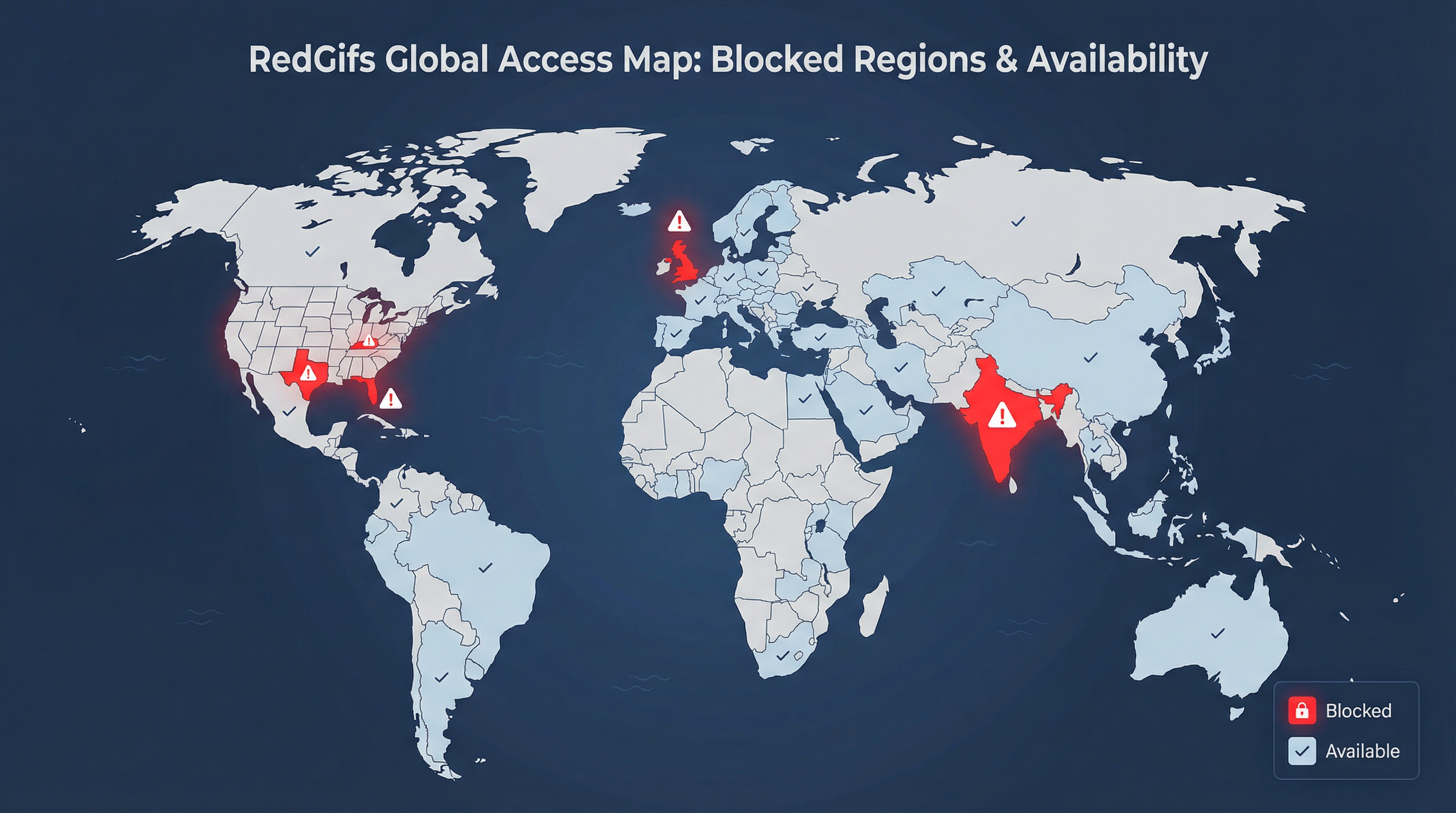
In the United Kingdom, the Online Safety Act, which took full effect on July 25, 2025, mandates strict age verification for adult websites. Instead of implementing invasive ID checks, RedGifs opted to block UK users entirely, redirecting them to a limited, work-safe version called RedGifs LITE.
Similarly, users in India have reported widespread blocking of RedGifs by government orders, affecting all major ISPs. Several U.S. states, including Texas, Florida, and Kentucky, have also enacted laws that lead to similar restrictions. This trend of government-level censorship is a major reason why so many users find RedGifs not working.
How can I fix RedGifs loading issues?
Before turning to more advanced solutions, it’s worth running through a checklist of quick technical fixes. These simple steps can often resolve the most common loading problems.
- Clear Your Browser Cache and Cookies: Old or corrupted data stored in your browser can cause loading errors. Clearing your cache and cookies is a quick and effective first step.
- Disable Ad Blockers and Extensions: While useful, ad blockers and other browser extensions can sometimes interfere with how websites load. Try temporarily disabling them to see if that resolves the issue.
- Try a Different Browser or Device: This helps determine if the problem is specific to your current browser or device setup.
- Flush Your DNS Cache: Your computer stores a cache of DNS lookups. If this data is outdated, it can prevent you from accessing websites. Flushing your DNS can help.
- Check if the Site is Down: Use a service like DownDetector to see if other users are reporting problems. If the site itself is down, you’ll just have to wait.
Can a VPN solve RedGifs access problems?
If you’re facing a regional block, a Virtual Private Network (VPN) is the most reliable and secure solution.
A VPN encrypts your internet traffic and routes it through a server in a different location, effectively masking your IP address and making it appear as though you are browsing from another country.

This not only bypasses government and ISP-level blocks but also enhances your online privacy. By using a VPN, you can access RedGifs without having to submit personal identification, protecting you from potential data leaks and privacy intrusions.
Best VPNs for Accessing RedGifs
When choosing a VPN for RedGifs, prioritize providers with a strict no-logs policy, strong encryption, and a wide network of servers in privacy-friendly locations.
Speed is also crucial for a smooth streaming experience.
Here are our top recommendations for RedGifs based on extensive testing and reviews:
| VPN Provider | Key Feature | Server Network | Privacy Policy | Price (2-year plan) |
|---|---|---|---|---|
| NordVPN | Best Overall Performance & Security | 8,200+ worldwide | Strict No-Logs | $2.99/month |
| Surfshark | Best Value for Money | 3,200+ worldwide | Strict No-Logs | $1.99/month |
| ProtonVPN | Best for Advanced Privacy | 15,000+ worldwide | Swiss-based, No-Logs | $2.49/month |
NordVPN stands out as the best all-around choice, offering exceptional speeds, robust security features like its Threat Protection Pro, and a massive server network.
Surfshark provides an excellent budget-friendly alternative without compromising on privacy, and it allows for unlimited simultaneous connections.
For those seeking the highest level of privacy, ProtonVPN, based in Switzerland, offers advanced security features and a proven no-logs policy.
How to set up a VPN to access RedGifs?
Setting up a VPN is a simple process that takes just a few minutes.
- Choose and Subscribe: Select a reputable VPN provider like NordVPN and sign up for a plan.
- Download and Install: Download the VPN application for your device (PC, Mac, Android, or iOS).
- Connect to a Server: Open the app and connect to a server in a country where RedGifs is not blocked, such as Germany or the Netherlands.
- Browse Securely: Once connected, open your browser and navigate to RedGifs. You should now have full access.
How can I protect my privacy when accessing RedGifs?
Beyond using a VPN, there are other steps you can take to safeguard your privacy.

Always be cautious about the information you share online. Avoid using your real name or other identifying details in your username or profile. Regularly clear your browser history and cookies, and consider using a privacy-focused browser like Brave. A VPN remains your strongest defense, creating an encrypted tunnel that shields your online activities from prying eyes.
Conclusion
Whether you’re facing a simple technical glitch or a complex regional block, there are effective solutions to get RedGifs working again. While quick fixes like clearing your cache or disabling ad blockers can solve minor issues, a high-quality VPN is the ultimate tool for bypassing censorship and protecting your privacy. In an era of increasing online restrictions, taking control of your digital privacy is more important than ever.